
Lingoes is an easy-to-use dictionary and text translation software, It offers lookup dictionaries, text translation, cursor translator, index list and pronunciation of word in over 60 languages. These language are English, French, German, Spanish, Russian, Chinese, Japanese, Korean, Italian, Portuguese and more...我以前是用Webword這本英英字典,沒有什麼不好用的,只能說Lingoes的功能更強。強在什麼地方呢?只要啟動Lingoes,在電腦中遇到任何看不懂的英文字時,按shift後mouse指著字,就能立刻查字。如果遇到有些字不能用這個方法查,還有另一種方法:highlight選取這個字,按Ctrl+C,就能查字。Ctrl+C雖然是「複製」的快捷鍵,但是使用時的影響不大,因為如果是要paste,一定會移動mouse,只要mouse一移動,查字視窗就會立刻消失。會不會有不方便,只能說妨礙不大。這是我使用後的心得。更多功能可參考這裡。中文網頁在這裡。
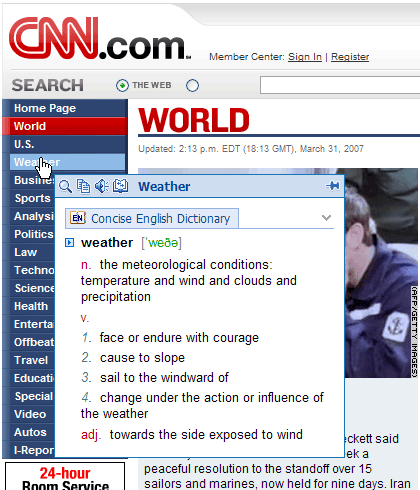
它有很多字典可下載安裝,包括:Oxford Advanced English Dictionary (6th), Oxford Advanced English-Chinese Dictionary (4th), Longman Dictionary of Contemporary English (4th) (more)...
跟Webword比較,這個檔案相對較大,又要另外下載字典安裝,是比較麻煩。如果你需要一個體積小的英英字典Webword是一個不錯的選擇。如果你平時就甚少看英文文件,只有上網時偶爾看看英文網頁,那麼Google Toolbar最適合你。Google Toolbar安裝在瀏覽器(IE/Firefox),內建翻譯功能,當你的mouse箭頭停留在字上時就會即時翻譯。當然還有其他功能,是必裝軟體之一。



No comments:
Post a Comment